


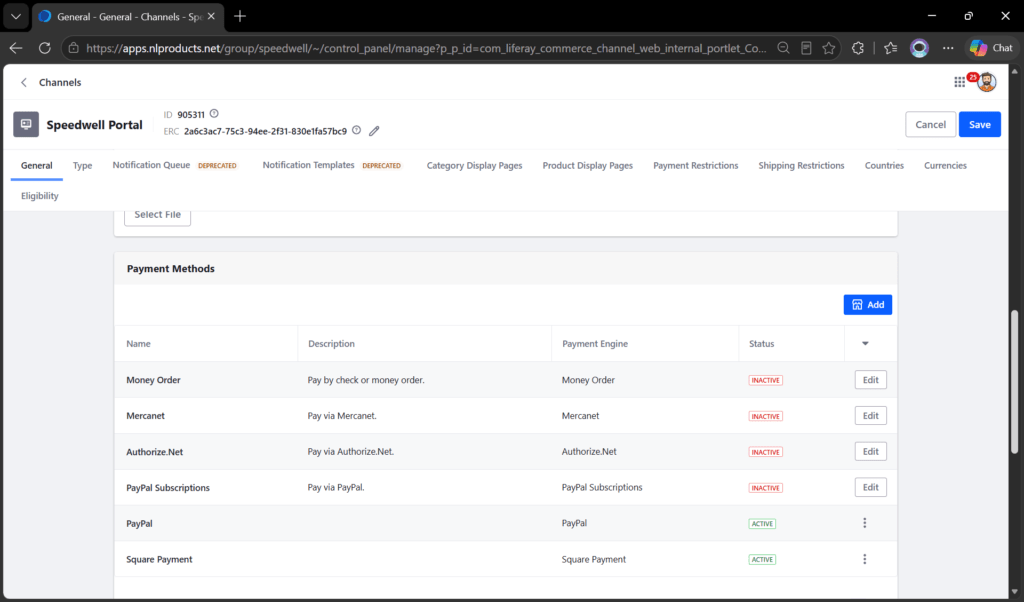
Integrating an external payment gateway with Liferay Commerce involves more than simply calling a payment API. A production-ready implementation must also handle payment configuration, secure communication, callback processing, status synchronization, and multi-channel requirements.
In this implementation, we integrated Square Payments with Liferay Commerce using a Spring Boot Client Extension.
The objective was to keep the Square-specific integration outside the Liferay runtime while allowing Liferay Commerce to continue managing the checkout and order lifecycle.
This article explains the architecture, payment flow, webhook handling, and a few of the important design decisions involved in the implementation.
Liferay 7.4 introduced a massive paradigm shift in how we extend the platform: Client Extensions. By moving custom logic out of Liferay’s core OSGi container and into decoupled, cloud-native microservices, developers gain unprecedented flexibility.
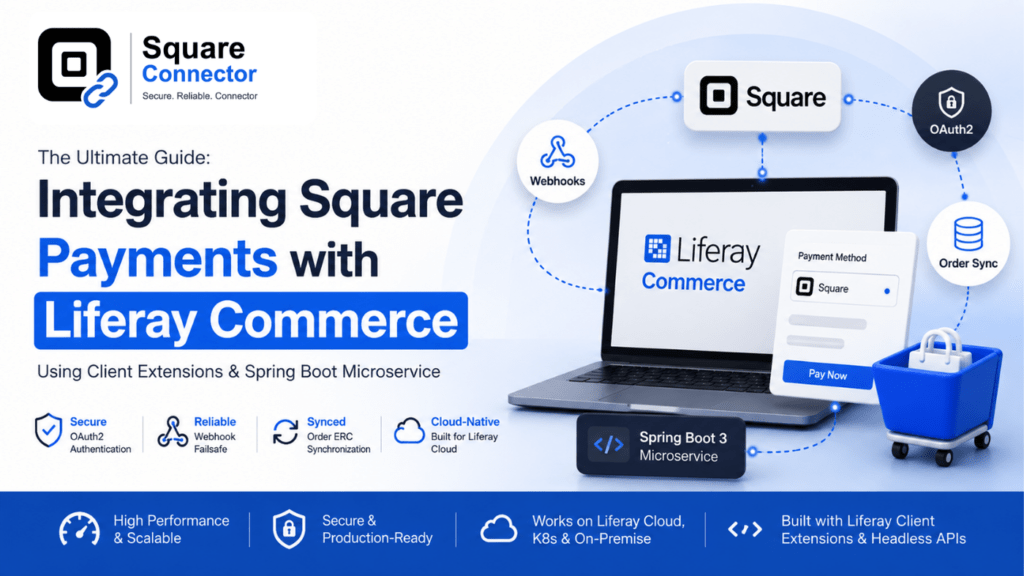
In this comprehensive guide, we will walk through exactly how we built and deployed a production-ready Square Payment Integration for Liferay Commerce using a Spring Boot 3 Microservice.
Whether you are deploying to Liferay Cloud (LXC), a custom Kubernetes cluster, or an on-premise standalone server, this guide covers every configuration step, environment variable, and troubleshooting trick you need to know.
Before you begin, ensure you have the following:
Liferay Client Extensions provide a clean way to connect Liferay with external services without deploying custom business logic directly inside the Liferay JVM.
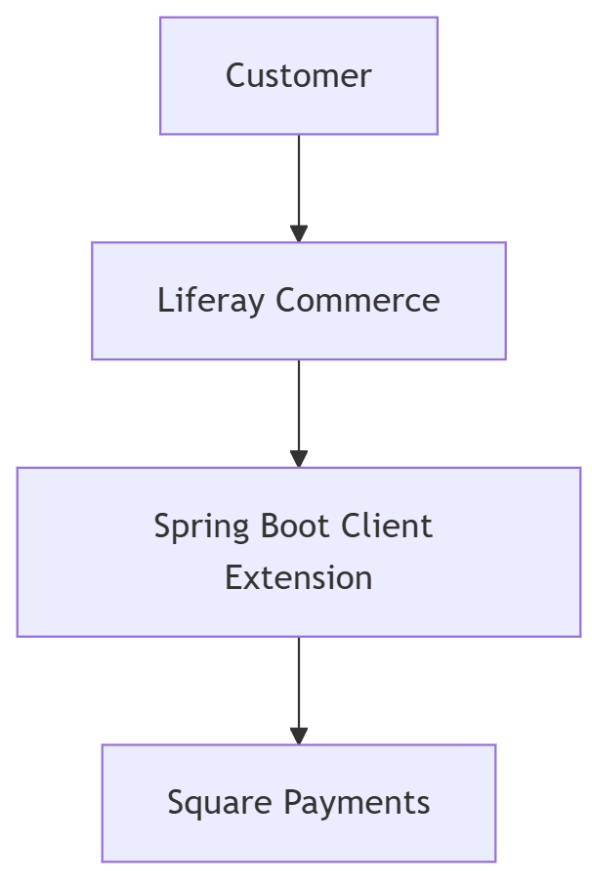
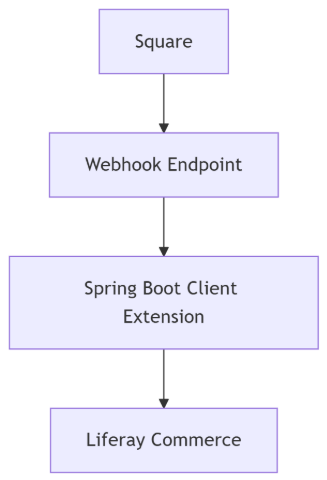
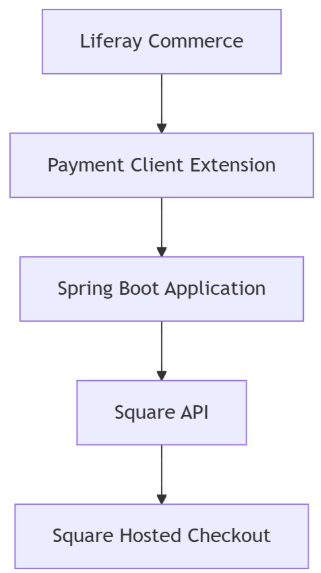
For the Square payment integration, the Spring Boot Client Extension acts as an integration layer between Liferay Commerce and Square.
At a high level, the flow is:
The responsibilities are separated clearly.
Liferay Commerce manages:
The Spring Boot Client Extension manages:
Square remains responsible for the actual payment processing.
The Square payment method is configured in Liferay Commerce and can be enabled for the required Commerce channel.
One of the important requirements was to avoid hardcoding Square credentials inside the Spring Boot application.
Instead, payment configuration can be maintained as part of the payment method settings.
Depending on the implementation, the configuration can contain values such as:
This is especially useful when the same Liferay installation contains multiple Commerce channels.
For example:
The same Spring Boot Client Extension can therefore be reused while each Commerce channel maintains its own Square configuration.
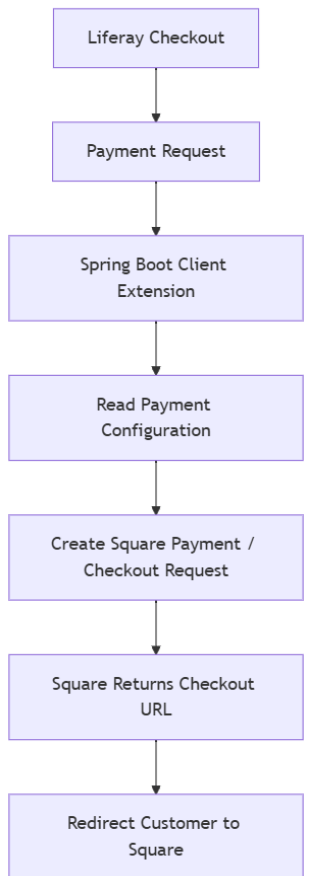
When the customer selects Square during checkout, Liferay invokes the payment Client Extension. The Spring Boot application receives the payment request along with the information needed to initiate the transaction.
The general flow is:
The Spring Boot service prepares the Square request using information such as the order amount, currency, order reference, and channel-specific Square configuration.
Square then returns the hosted payment URL.
The Client Extension sends the required response back to Liferay, allowing the customer to continue the payment process on Square's hosted checkout page.
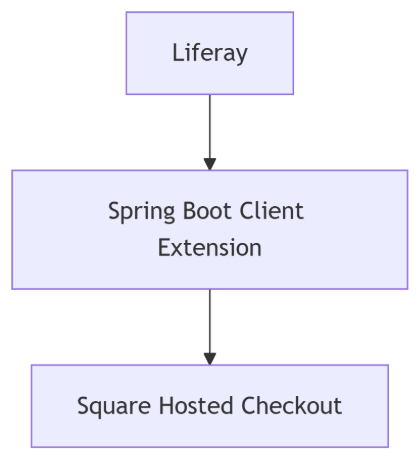
Using a payment page hosted by Square keeps sensitive payment details outside the Liferay application. Instead of collecting card information directly inside Liferay, the customer enters the payment information on Square's infrastructure.
This simplifies the integration and reduces the amount of sensitive card-related data handled by the Liferay application and the Client Extension.
The flow becomes:
Once the customer completes or cancels the transaction, the user can be redirected back to the appropriate Liferay page. However, that browser redirect should not be treated as the authoritative payment confirmation.
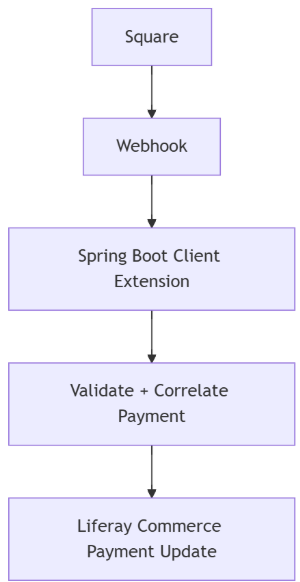
The asynchronous webhook flow is one of the most important parts of the integration.
After a payment event occurs, Square sends a request to the webhook endpoint exposed by the Spring Boot Client Extension.
A webhook event can contain information such as:
The Client Extension uses this information to identify the corresponding Liferay Commerce transaction and update the payment status.
A public webhook endpoint can technically be called by anyone.
For example, someone could send a request from Postman and manually add a header named:
x-square-hmacsha256-signature
Therefore, checking whether the header exists is not sufficient.
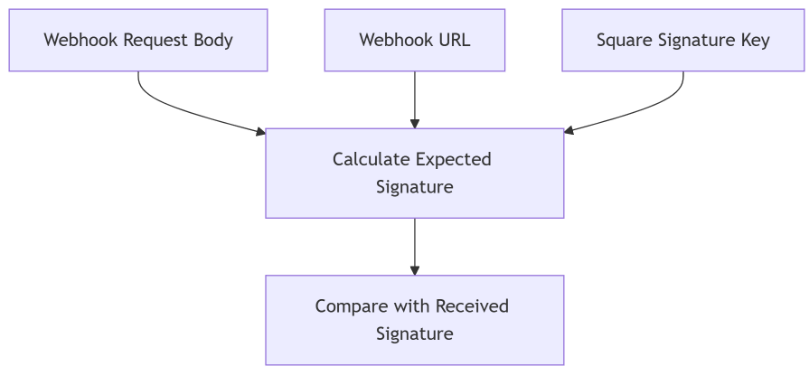
The signature itself must be validated.
The general validation process is:
Another important requirement is maintaining a reliable relationship between the Square transaction and the Liferay Commerce order.
During payment creation, the integration should maintain identifiers that make later reconciliation possible.
Typical values include:
This correlation is particularly important when the webhook arrives because the webhook originates from Square, not from Liferay.
The integration needs to determine which Liferay order and Commerce channel belong to the incoming Square event.
A stable correlation mechanism also helps during troubleshooting and payment reconciliation.
Multi-channel support adds another architectural consideration.
During the initial Liferay-to-Client-Extension request, channel-specific configuration can be available to the payment integration.
However, when Square later calls the webhook, the request originates directly from Square.
Therefore, the webhook does not automatically include the Liferay payment method configuration.
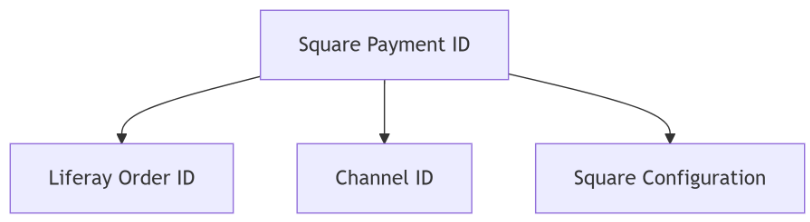
The application must use available identifiers, such as the Square transaction or Liferay order reference, to resolve the correct configuration.
This is an important consideration when different Commerce channels are connected to different Square accounts.
A conceptual mapping can look like this:
This makes webhook processing deterministic and prevents the application from using the wrong Square account configuration.
After completing a payment, Square can redirect the customer back to Liferay.
That redirect is useful for the customer experience, but it should not be considered final proof that payment succeeded.
The browser is client-controlled.
Therefore:
The authoritative payment state should come from a validated server-to-server source.
This is particularly important when updating a Liferay Commerce payment from pending to completed.
Payment providers can retry webhook delivery.
As a result, the same event may reach the Client Extension more than once.
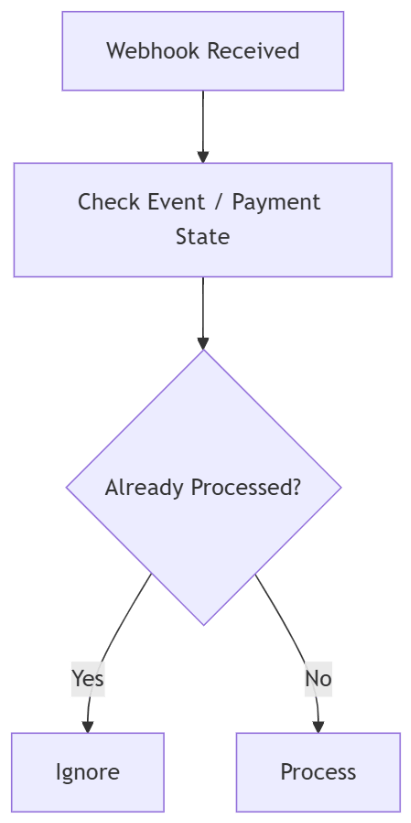
The integration should therefore be idempotent.
For example:
This prevents the same Square event from triggering duplicate payment updates.
Idempotency is especially important for payment integrations because network retries and temporary service failures are normal operational scenarios.
Payment integrations should also be designed for situations where external systems are temporarily unavailable.
Some scenarios that should be considered include:
Logging should make it possible to trace a transaction across systems.
Useful identifiers include:
At the same time, secrets such as Square access tokens, webhook signature keys, or authentication headers should never be written to application logs.
Unlike legacy OSGi plugins that ran inside Liferay, this integration consists of two decoupled pieces:
Data flows in both directions:
The overall implementation can be summarized as follows:
The asynchronous payment update works in the opposite direction:
This architecture keeps Liferay focused on the commerce lifecycle while the Client Extension handles Square-specific integration logic.
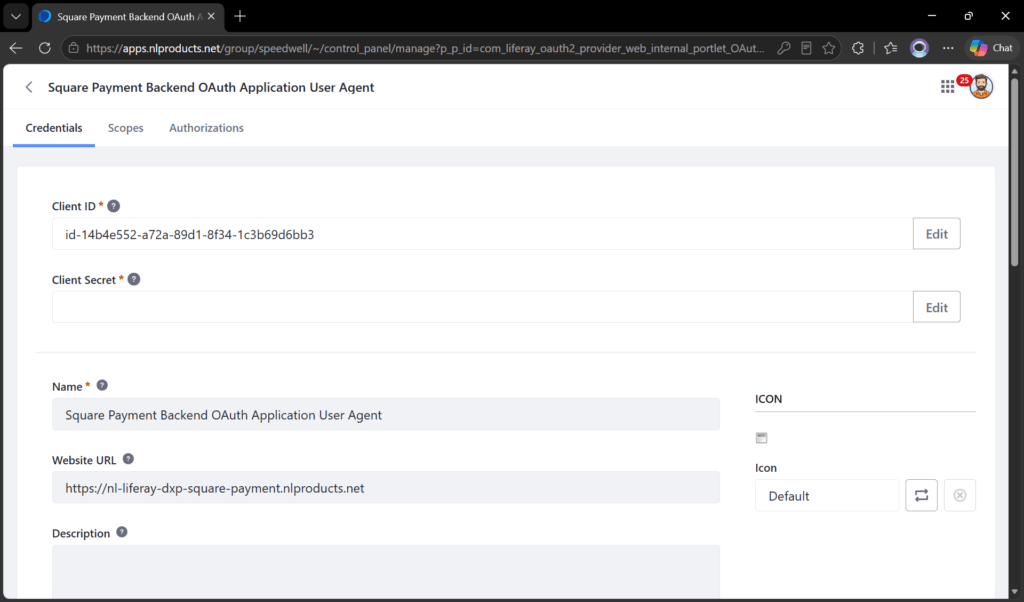
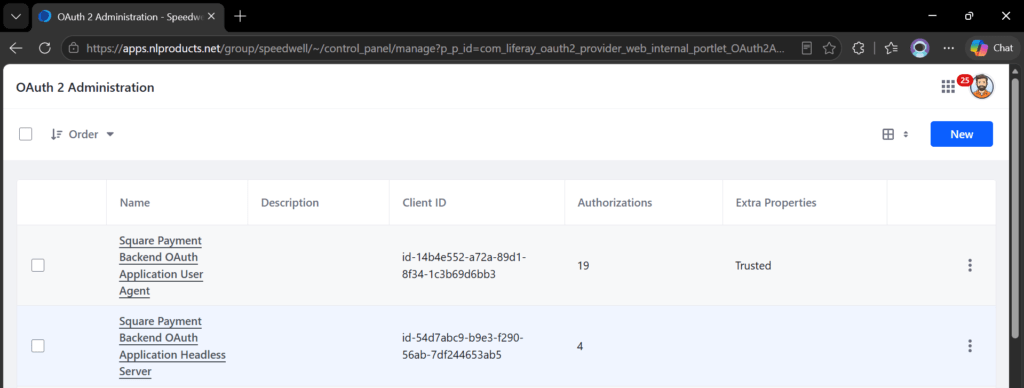
Unlike legacy configurations where URLs were hardcoded in source files, you do not need to modify the client-extension.yaml file for your specific environment (QA vs Prod).
Simply deploy the client-extension.yaml as-is. Once it deploys, Liferay generates the OAuth2 applications. You can then dynamically configure the routing directly from the Liferay Admin UI:
Pro-Tip: Updating the Website URL directly from the Liferay UI allows you to instantly change your routing on the fly without ever needing to redeploy the Client Extension YAML!
Deploy your Spring Boot .jar via Docker, Kubernetes, or standalone Java.
To allow your Spring Boot code to securely call Liferay's Headless APIs, you must inject the Headless Server credentials into the container environment. The User Agent credentials are NOT required for the Spring Boot side. You must also inject your Square Webhook Signature Key (more on this in Step 4).
square-payment-backend-oauth-application-headless-server.oauth2.headless.server.client.id=YOUR_HEADLESS_CLIENT_ID
square-payment-backend-oauth-application-headless-server.oauth2.headless.server.client.secret=YOUR_HEADLESS_CLIENT_SECRET
square.webhook.signature.key=YOUR_SQUARE_WEBHOOK_SIGNATURE_KEY
com.liferay.lxc.dxp.mainDomain=apps.yourdomain.com
com.liferay.lxc.dxp.server.protocol=https
Webhooks guarantee your Liferay orders are finalized even if the buyer closes their browser immediately after paying.
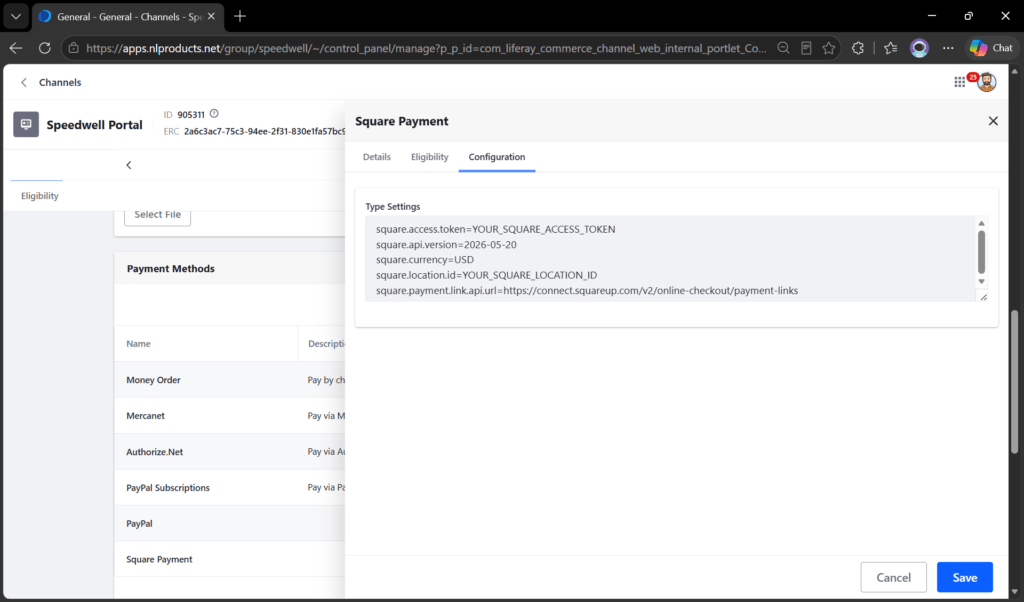
Finally, link your Square credentials to your Liferay storefront.
square.access.token=YOUR_SQUARE_ACCESS_TOKEN
square.location.id=YOUR_SQUARE_LOCATION_ID
square.api.version=2026-05-20
square.currency=USD
square.payment.link.api.url=https://connect.squareup.com/v2/online-checkout/payment-links
If you are testing this integration using a Square Sandbox Access Token (which usually starts with EAAAl), you must change the api.url in the settings above to https://connect.squareupsandbox.com/v2/online-checkout/payment-links.
If you accidentally pass a Sandbox token to Square's production URL, Square will reject it with a 401 UNAUTHORIZED error, and Liferay will display a generic "An error occurred" message on the checkout page!
A Spring Boot Client Extension keeps external payment logic outside the Liferay JVM. It can be deployed, maintained, scaled, and upgraded independently while still integrating with the Liferay Commerce payment lifecycle.
Yes. Channel-specific payment configuration can be maintained so that different Commerce channels can connect to different Square accounts while using the same Client Extension.
No. The presence of the header alone does not prove that the request originated from Square. The received signature must be cryptographically validated using Square’s webhook signature verification mechanism.
Yes, anyone who knows the public webhook URL can technically send an HTTP request to it. However, without a valid Square-generated signature, the request should fail signature validation and must not be processed.
Not necessarily for every event. A correctly validated webhook can be used to process the payment event. However, in some scenarios, retrieving the payment from Square again can provide an additional verification layer for status, amount, or transaction reconciliation.
No. The browser redirect should mainly control the customer experience. Payment completion should be based on trusted server-to-server confirmation, such as a validated Square webhook or Square API response.
The integration should maintain a correlation between Liferay identifiers and Square transaction identifiers when the payment is created. This allows the Client Extension to resolve the correct Commerce order when a webhook arrives.
The webhook handler should be idempotent. Already processed events or payment states should be detected so that the same payment update is not executed multiple times.
Webhooks are triggered directly by Square, bypassing Liferay completely. Because Square doesn’t know about Liferay’s “Type Settings” payload, the Spring Boot application must read the Webhook Signature Key directly from its own environment variables to cryptographically verify the incoming Square request.
No. Spring Boot only uses the Headless Server credentials to authenticate its outbound calls back to Liferay (to update the order status). The User Agent credentials are used internally by Liferay to route the payload to Spring Boot.
No! This is a harmless warning from the com.liferay.client.extension.spring.boot starter library. It complains if it doesn’t find a global default client ID. As long as you provided the headless-server environment variables correctly and your application accepts requests, this warning can be safely ignored.
For security reasons, Liferay intentionally hides raw payment gateway errors (like “Invalid API Key”) from the frontend customer. To debug, check the logs of your Spring Boot microservice. You will see the exact JSON error returned by Square (e.g., UNAUTHORIZED if your token is invalid or belongs to the wrong Sandbox/Production environment).
This happens if your Ingress/Load Balancer is not stripping the URL prefix. The Spring Boot application strictly listens on the root path / (e.g., /ready). If your reverse proxy forwards the request as /square-payment/ready, Spring Security will reject the unknown path with a 401 Unauthorized. To fix this, configure your Ingress to strip the prefix (Rewrite Target) before forwarding to the container.
It will cause routing conflicts. You must uninstall or deactivate any old OSGi modules (com.nirvanalab.commerce.payment.method.square) from the Liferay App Manager to ensure Liferay strictly invokes the new Client Extension.